
A creator we'll call a3f7c2 watched 12 patron moments land in a
single morning — 1 new paid, 4 new free, 0 cancelled, 0 card-declined.
Before FanConvert, that morning was invisible.
What the dashboard shows you
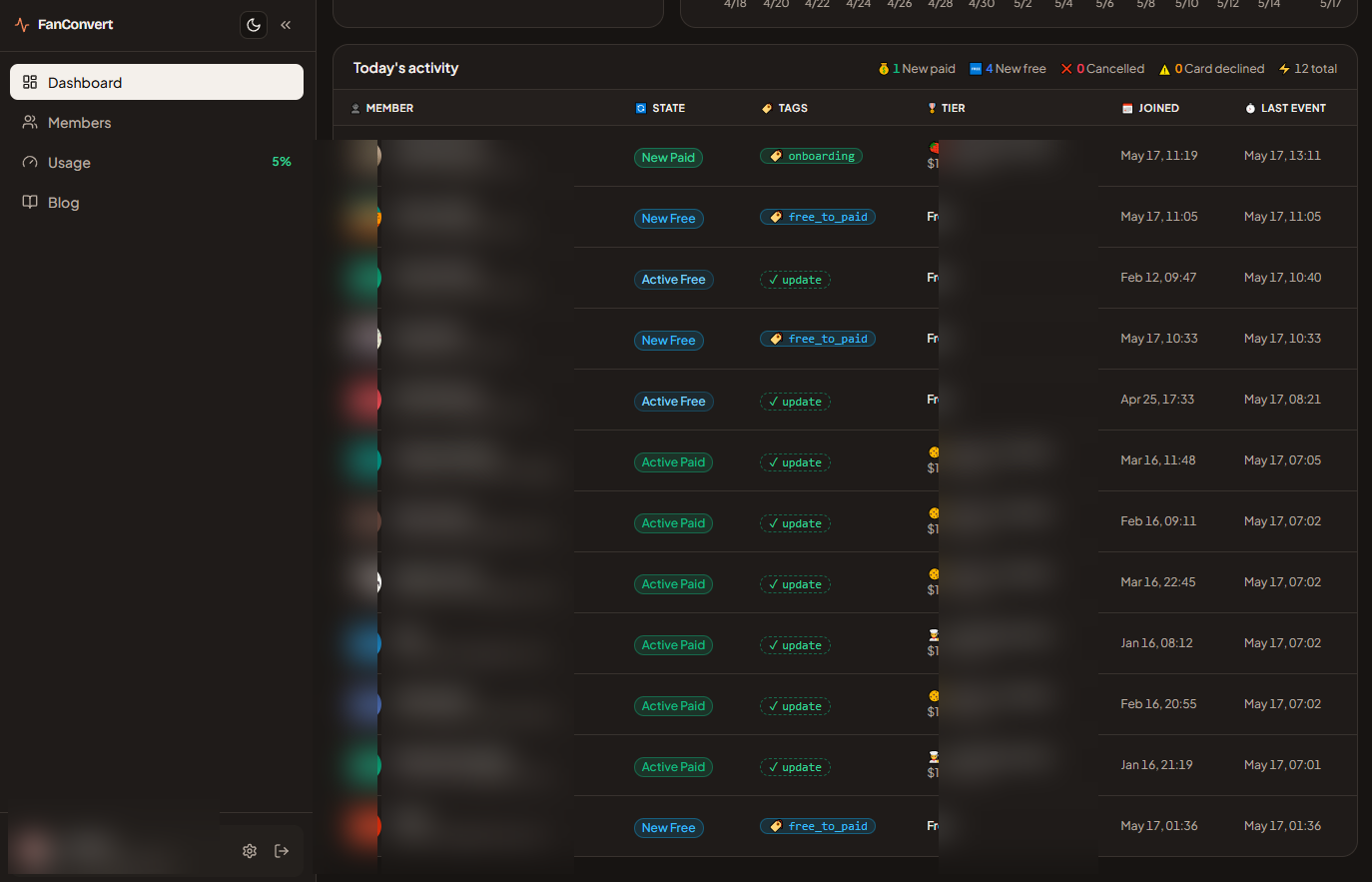
The Dashboard's Today's activity view is one screen. Five summary chips across the top count today's moments:
- New paid — fresh paid pledges. Fires Welcome
(
onboarding). - New free — free followers who upgraded.
Fires
free_to_paid. - Cancelled — pledges dropped this cycle. Fires Winback · Cancel.
- Card declined — renewal charges that failed. Fires Winback · Decline.
- Total — every Patreon moment seen today.
Underneath, every patron involved appears as a row. Each row carries:
- Member — name and avatar from Patreon.
- State — a pill that reads New Paid, New Free, Active Paid, or Active Free.
- Sequence — the label FanConvert just wrote into your email tool
(
onboarding,free_to_paid, orupdatefor record edits that aren't a lifecycle moment). - Tier — the pledge amount they're at right now.
- Joined — when they first pledged.
- Last event — when this moment landed, down to the minute.
Refresh-free. Open the page during a launch and rows appear as Patreon delivers them.
Why the row matters more than a notification
When a patron emails saying they never got a welcome, you have two questions: did the moment reach FanConvert, and did your email tool get the label?
The row answers both in 5 seconds. The Last event timestamp shows
Patreon's update arrived. The Sequence cell shows which label
went to your tool. If it reads onboarding, your Welcome sequence
fired — and the missing email is a filter problem inside your email
tool, not a FanConvert one.
If no row exists for that patron, Patreon never sent the moment. That's a Patreon-side problem, and now you know where to look.
The record stays
Every row stays on the page. A patron who cancelled 3 months ago is still in the history — scroll back, read the timestamp, confirm which sequence ran. Most "where's my email" exchanges shrink to one screenshot.
Getting started
Today's activity is live the moment you connect Patreon. Free (50 moments / month, no card) covers a first campaign push end to end. Early Bird ($29 / month, limited seats, price-locked for life) and Standard ($39 / month, always-on) handle up to 3,000 moments a month.
You don't have to guess which sequence fired. The row is there.